Frequently Asked Questions

Frequently Asked Questions
Whether you just spotted one of our trailers in a parking lot, you are choosing between the Alarm.com, OpenEye, and Sharpvue OS builds, or you are getting ready to deploy a fleet, here are the questions we hear most.
Sharpvue builds mobile AI surveillance for places where grid power and permanent infrastructure don't reach: solar-charged surveillance trailers, portable surveillance units, NDAA-compliant cameras, and the Sharpvue OS software that runs them. Founded in 2015 and headquartered in Chapin, South Carolina, we design and assemble our units in the United States and sell and service them through a national network of authorized dealers.
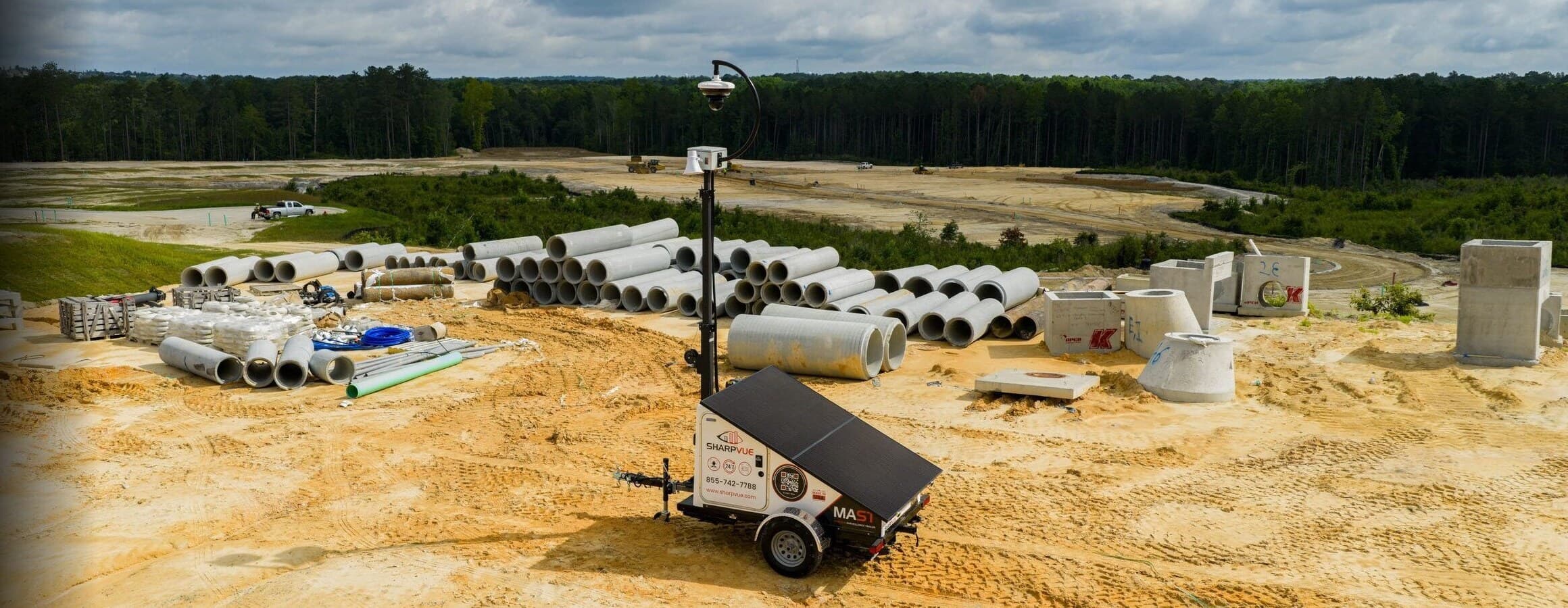
MAST is our Mobile AI Surveillance Trailer: a towable, solar-charged trailer with a 22-foot mast, a 1,180 W solar array, and a battery bank sized to keep the cameras recording for 8–10 days on a full charge with no sun, grid, or generator. The MAST-mini is the compact version for tighter sites.
Our headquarters and assembly plant are both on Dutch Fork Road in Chapin, South Carolina, just outside Columbia. Units are deployed across North America through our dealer network, and you can find a dealer in your area on the site.
Our team in Chapin, South Carolina is available by phone and email Monday through Friday from 8 a.m. to 8 p.m. Eastern, and Saturday from 10 a.m. to 5 p.m. We are closed on Sunday. Deployed units are watched around the clock by Sharpvue OS, which detects and in many cases repairs faults automatically, and your dealer or monitoring center can be reached on the schedule in your service agreement.
Open positions are posted on our careers page, where you can apply online. You can also send a résumé and a note about the kind of work you are looking for to careers@sharpvue.com.
The Sharpvue OS page explains the software that runs every unit. Our guides cover how to compare mobile surveillance trailers, what they cost, how solar runtime works in your part of the country, and why prevention matters more than prosecution. If you would rather see it live, request a demo and we will walk you through a unit.
It is most likely a Sharpvue surveillance trailer deployed by the owner or manager of that property to keep the lot, jobsite, or facility safe. The solar panels charge its batteries during the day, the mast lifts the cameras high enough to see the whole area, and the cameras stream video to the customer's own secure account. Its job is to prevent theft, vandalism, and trespassing before they happen, not just to record them afterward.
Active. A conventional camera records an incident for someone to review later. A Sharpvue unit uses AI to detect people and vehicles in real time, flags the event, and can respond on the spot with lights, strobe speakers, two-way audio, and alerts to the customer or their monitoring center. The visible presence of the trailer itself is part of that deterrence.
It depends on the camera and the site. From the top of a 22-foot mast, our pan-tilt-zoom cameras with 25X and 36X optical zoom can cover a large parking lot, laydown yard, or jobsite from a single position, and fixed and fisheye cameras fill in the area around the unit. Low-light and thermal options extend coverage through the night. Your dealer will size the camera package to the area you need to watch.
Most retail loss happens in and around the parking lot: cart theft, catalytic converter theft, break-ins, and organized retail crime crews staging outside. A Sharpvue unit covers the lot and entrances with AI detection and active deterrence, gives loss-prevention teams live and recorded video from anywhere, and lets a store respond while an incident is still in progress rather than filing a report after it.
Sharpvue units watch the property they are deployed on, in public and semi-public areas like parking lots, jobsites, and building exteriors, on behalf of the property owner or manager. They are not pointed at individuals. Sharpvue AI detects that a person or vehicle is present so events stand out for the customer; it does not identify people, and it does not read, store, or share license plate numbers.
Only the customer the unit is deployed for and the people they authorize, such as their security team or monitoring center. Video and events are isolated to that customer's account. Footage is never pooled across customers, never shared with other Sharpvue customers, and never sold. Sharpvue staff do not browse customer video; access for support purposes happens only at the customer's request.
On Sharpvue OS builds, video records continuously to the customer's iVISION cloud account on a retention window the customer sets, and recordings age out automatically unless the customer has flagged, exported, or attached them to a case. On Alarm.com and OpenEye builds, the cameras record continuously to onboard SD cards on a FIFO basis (first in, first out), so the oldest footage is overwritten as the card fills. Cards are typically 512 GB and can go to 1 TB or more, which at normal settings holds weeks of continuous video per camera. Event clips are kept in the cloud under the customer's Alarm.com or OWS plan.
No. Sharpvue AI performs license plate detection: it flags that a plate is in view so a vehicle event stands out in the customer's timeline. It does not read plate numbers, it does not store them, and there is no shared license plate database behind Sharpvue units. There is no cross-customer lookup network and no third-party data feed.
Footage belongs to the customer the unit is deployed for, so requests go to the property owner or manager, not to Sharpvue. Sharpvue does not release customer video to third parties. If you are not sure who operates a unit, contact us with its location and we will pass your request to the customer.
Video from a deployed unit is controlled by the customer, so for footage related to an incident please contact the property owner or manager directly; most will cooperate quickly. For valid legal process, or if you cannot identify the operator of a unit, email help@sharpvue.com with the unit's location and we will connect you with the right customer. Agencies interested in deploying Sharpvue units of their own can visit our law enforcement page.
Please let us know. Call 855-742-7788 or email help@sharpvue.com with the location of the unit and what you saw, and we will reach the customer and dealer responsible for it. Every unit reports its own health back to Sharpvue OS, so we may already know, but a description from someone on site always helps.
The same Sharpvue trailer hardware runs on your choice of three platforms:
- Sharpvue OS (SVOS), with the iVISION cloud video management system
- Alarm.com for Business, sold as the MST-AC build
- OpenEye Web Services (OWS), sold as the MST-OE build
Choose the one you already use, so trailers show up in the same system as your fixed sites. None of the three locks you in: Sharpvue cameras use open RTSP and ONVIF standards, so they can stream into most third-party video management systems, and Alarm.com and OpenEye both offer open options through their recorder solutions if a customer wants to go that route.
Yes, and that is exactly how the program is designed to work. Fully integrated trailers on both Alarm.com and OpenEye are available to dealers through their dealer rental programs. You rent the trailer from Alarm.com or OpenEye, deploy it at your customer's site, and rent it on to your customer under your own agreement, with the video and health monitoring running in the same account as the rest of your installs. There is no capital outlay to build and maintain a fleet, you add trailers as demand grows, and you can still buy units outright whenever ownership makes more sense.
Yes. Health monitoring, diagnostics and fleet mapping come from MySharpvue and work the same on every trailer, whichever platform you run. Battery, solar output, connectivity and camera status all show live on one screen.
The MST-AC is a mobile security trailer fully integrated with Alarm.com for Business. Alarm.com is the video platform: live video and the on-site security system work from the same Alarm.com app, and the login that arms the site also brings up every camera. Underneath, Sharpvue OS runs the trailer itself: power and solar management, managed connectivity, health diagnostics, ODIN auto-healing, remote power control, PTZ control, and fleet management and logistics through MySharpvue.
Everything the trailer does is in the one app:
- View live video, arm the intrusion system and control access, all in one place
- Arm and disarm the on-site security system remotely
- Speak to people on-site through the mast's camera and speaker
- Give several users access under a single login
Yes. The MST-AC can be built with a full Alarm.com for Business security system on board, so the trailer is not only a camera platform but the alarm panel for the site. Pair wireless Alarm.com sensors around the property, such as door and window contacts, motion detectors, and gate or equipment sensors, and they report to the trailer. Arm and disarm from the same Alarm.com app you use for video, get alerts the moment a sensor trips, and add central-station monitoring through your Alarm.com dealer. It is a trailer with an Alarm.com system built in, and Alarm.com happens to be the best one there is.
Live video goes to the cloud through the trailer's cellular router, with multi-carrier failover and optional Starlink anywhere cellular can't reach. The trailer runs on solar power, so it doesn't need grid power or a wired network connection.
The Alarm.com PRISM Series 8MP Varifocal Bullet (ADC-VC7398PA):
- 4K (8MP) resolution, with full-color video at night
- Infrared up to 40 m
- Full two-way audio for talk-down
- Rated IP66, IP67, IK10 and NEMA 4X, and NDAA-compliant
The MST-OE is a mobile security trailer fully integrated with OpenEye Web Services (OWS). OWS is the video platform: the cameras record continuously to their onboard SD cards, event clips go to the OWS cloud, and the trailer runs from the same OWS account as your fixed sites. Underneath, Sharpvue OS runs the trailer itself: power and solar management, managed connectivity, health diagnostics, ODIN auto-healing, remote power control, PTZ control, and fleet management and logistics through MySharpvue.
It keeps recording. Every camera on the OpenEye and Alarm.com builds records 24/7 to an SD card inside the camera, and only event clips are sent to the cloud, so a dropped connection never leaves a gap in the recording. When the connection returns the trailer picks up where it left off.
Through the same OWS tools as any other OpenEye site:
- Single sign-on, with permissions by role that follow each user wherever they log in
- Web, mobile and desktop (Command Station) apps
- Smart search that quickly finds footage across every recorder
- OWS AI video analytics
Yes. The cameras only make outbound connections, so there are no inbound ports exposed to the internet, and every trailer sits behind a 256-bit encrypted VPN connection.
Two OpenEye cloud cameras:
- OE-CC52B5 5MP Cloud Bullet: 2.7–13.5 mm motorized zoom, rated IP67 and IK10
- OE-CC3214F12 12MP Cloud Fisheye: 360° view, rated IP67 and IK10
Sharpvue OS (SVOS) is the operating system that runs every Sharpvue unit. It manages the cameras, connectivity, power and the whole fleet in one system. Video is handled by iVISION, Sharpvue's cloud video management system, which has a mobile app.
Video records continuously to the iVISION cloud, 24/7. Every camera on the Sharpvue iVISION platform also has an SD card, which serves two purposes: failover, so the camera keeps recording locally if the connection drops, and a higher-resolution copy of the footage than the cloud stream. On the Alarm.com and OpenEye builds the cameras record 24/7 to their SD cards and event clips go to the cloud.
No. MySharpvue has a full web video management system built in:
- Unlimited live viewing. Watch as many feeds as you want, for as long as you want.
- AI on screen. People, cars, trucks and license plates are detected and boxed as they appear.
- Camera walls. Build multi-camera views across trailers and sites, group them by customer or job site, and save them.
- Timeline search. A visual timeline with thumbnails and AI results takes you straight to the moment something happened.
- Download and export. Your video is yours. Export clips anytime for an incident report, an insurance claim or the police.
- No extra fees. No add-on fees and no per-unit licensing.
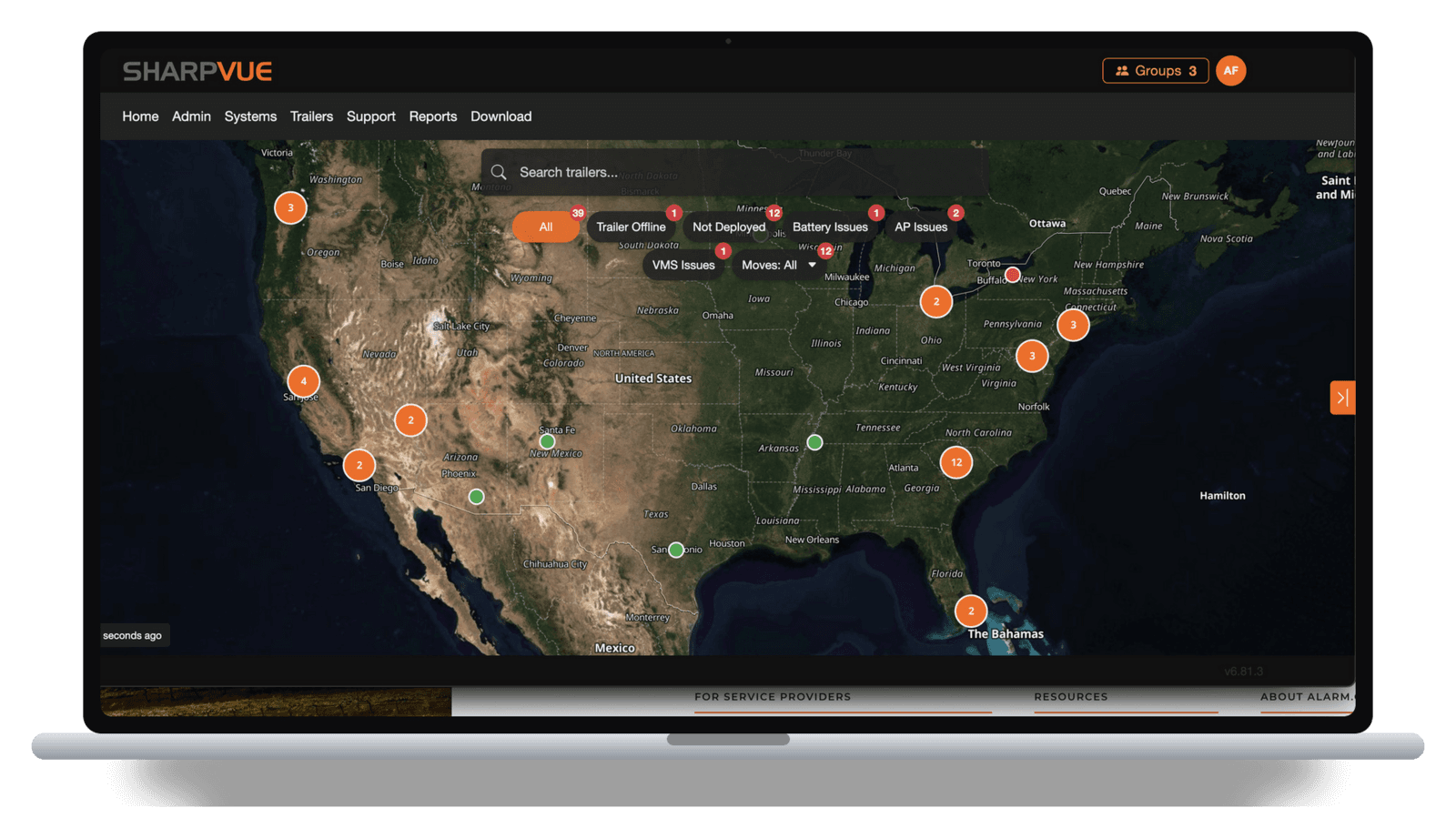
MySharpvue is the fleet portal. It shows:
- Health: battery, solar output, connectivity and camera status, live
- Diagnostics: alerts on every part of the system before a unit goes offline
- Map: the whole fleet on one map, searchable by trailer or location
- Remote power control: restart a camera or a whole unit from your phone, without sending anyone out
- Event alerts: automatic notifications about power, battery or connectivity
- Move requests: ask to relocate a trailer and track it through Requested → Scheduled → En Route → Delivered → Deployed
ODIN is Sharpvue's AI that looks after the fleet. It reads a trailer's diagnostics, finds the cause, and fixes what it can on its own, overnight or between jobs. What it can't fix goes to a technician with the diagnosis already done.
Yes, on every platform. Remote Video Monitoring is an optional service: when the AI detects something, a live operator speaks through the trailer's speaker and calls out the intruder directly. Police are sent only when a crime is confirmed on camera, and your team gets a report after every incident. We work with the best monitoring centers in the industry and can work with any one of them. If you or your dealer already use a central station, the trailer plugs into it; if not, we will connect you with one that fits your sites.
We do not publish list prices, because every unit is configured for the site: platform, number and type of cameras, battery and solar options, connectivity, and whether you rent or buy. Use Build a Trailer to configure exactly what you need and you will receive a quote with pricing and lead time within one business day. Volume and agency pricing are available.
Yes. Fully integrated trailers and portable units are available to rent through our dealers with no upfront capital, which suits jobsites, events, and seasonal needs. Owning makes sense for permanent or multi-year deployments, and if you own hardware from another provider, our BYOT and trade-in program can convert or replace it. If you are a dealer, you can also rent fully integrated trailers directly through Alarm.com or OpenEye.
Sharpvue units are sold and rented through authorized dealers, so your invoice comes from your dealer and they are the first stop for billing questions. Legacy customers who purchased directly from Sharpvue can always reach out to us directly: email help@sharpvue.com or call 855-742-7788 and we will help you out and point you to the correct contact. The same goes if you are not sure who your dealer is.
Start with your dealer, who can see your unit's health, power, connectivity, and cameras in MySharpvue and fix most issues remotely. You can also reach Sharpvue support at help@sharpvue.com or 855-742-7788. Every unit runs Sharpvue OS with ODIN diagnostics, which checks the unit's full state and repairs many faults without anyone having to visit the site.
If you rent, submit a move request in MySharpvue or contact your dealer, and track it from Requested through Deployed. If you own the unit, a MAST trailer tows behind a standard pickup: lower the mast fully, hitch up, and move it. Because the unit is solar-charged and connects over cellular or Starlink, there is nothing to unplug and nothing to re-wire at the new location.
Sharpvue is sold and serviced through authorized dealers, who handle quoting, installation, rental, and first-line support, backed by Sharpvue's engineering and manufacturing team in Chapin. Security integrators, alarm dealers, and rental operators interested in carrying Sharpvue can apply through our dealer program or call 855-742-7788, extension 1.
We are happy to help. Call 855-742-7788, email info@sharpvue.com, or use the contact form and a member of the Sharpvue team will get back to you within one business day.
Ready to learn more?
Now that you have read about Sharpvue, see it running. Request a demo and a specialist will walk you through a live unit, the fleet portal, and the platform that fits your sites. Or configure a unit yourself and get a quote within one business day.
Prefer to talk? 855-742-7788